Content Generation for SEO
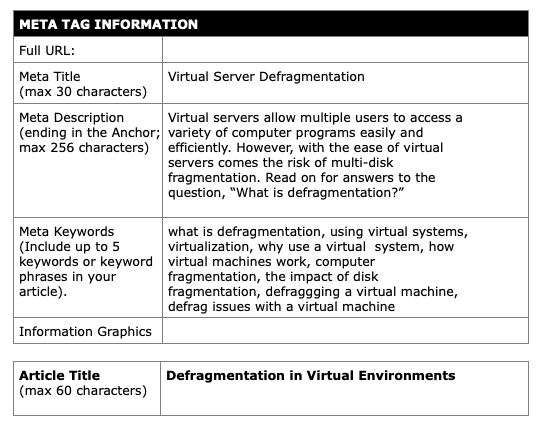
Developed using the following metadata:
Resulting article:
Virtual Server Defragmentation
If your network is running virtual machines, then you already know the benefits of computing in a virtual environment. The possibilities in terms of programs and productivity are seemingly endless, and still evolving.
You may, however, also be familiar with how these endless possibilities can result in fragmentation of your storage disks. The impact of disk fragmentation can drain the joy out of using virtual systems, making them sluggish and unreliable.
If this sounds like the virtual machines in your home or office, read on to learn more about computer fragmentation, and some methods for defragging a virtual machine.
Virtual Machines
Before we discuss fragmentation, it’s important to understand how virtual machines work.
Virtual machines occur when you to split a physical server into multiple, individual servers. This is done through virtualization software, which divides the physical resources so that each virtual machine has its own processors, memory, networking, storage and basic input/output systems (BIOS).
There are two types of virtual server setups: Hosted Architecture and Hypervisor Architecture.
Hosted Architecture refers to a virtual machine setup that sits on top of a “host” operating system. A Windows operating system can be a host, and using software to split your resources into virtual machines would create a hosted architecture. The Windows system acts as a host between the hardware and the virtual machine, which is referred to as the “guest.” Each guest stores a file called a “virtual disk” on the host system.
Hypervisor Architecture refers to a virtual machine setup that sits directly on the server. The hypervisor is a specialized, lightweight software with the specific purpose of abstracting and separating the server resources into virtual machines, or “guests.” The hypervisor manages the guest’s relationships with hardware and storage without introducing many program and memory requirements of its own.
Why use a virtual system in the first place? With virtual servers, multiple programs and processes can run on one physical server without software conflicts or slow processors. You get the flexibility and speed of multiple servers with the low cost and easy management of a single unit.
 Angela Bull -- Portfolio
Leave a comment